
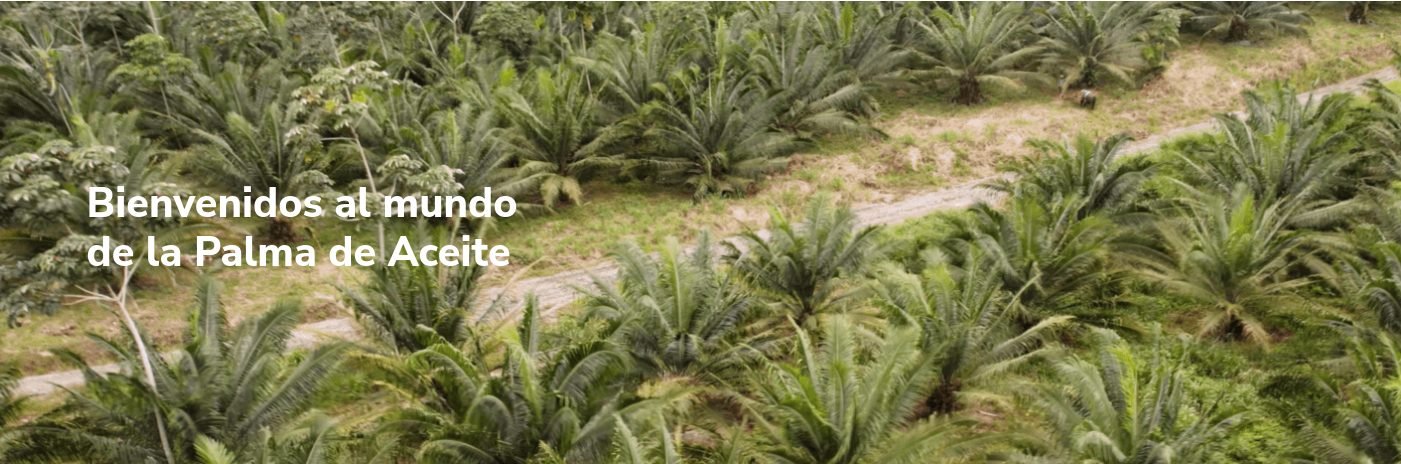
En este banner se muestra una imagen, que se muestra una imagen con un ancho de 100%, pero su alto se ajusta a un rateo definido.
Campos Personalizados
Banner de ancho total
full_width_banner
(Block)
Imagen
field_image
Referencia/Multimedia/Imagen
Archivos Usados
1.
block--full-width-banner.html.twig
Twig
templates/blocks/
Block
1.
block--full-width-banner.html.twig
Twig
templates/blocks/
Block
{#
/**
 * @file
 * Theme override to display a block.
 *
 * Available variables:
 * - plugin_id: The ID of the block implementation.
 * - label: The configured label of the block if visible.
 * - configuration: A list of the block's configuration values.
 *   - label: The configured label for the block.
 *   - label_display: The display settings for the label.
 *   - provider: The module or other provider that provided this block plugin.
 *   - Block plugin specific settings will also be stored here.
 * - in_preview: Whether the plugin is being rendered in preview mode.
 * - content: The content of this block.
 * - attributes: array of HTML attributes populated by modules, intended to
 *   be added to the main container tag of this template.
 *   - id: A valid HTML ID and guaranteed unique.
 * - title_attributes: Same as attributes, except applied to the main title
 *   tag that appears in the template.
 * - title_prefix: Additional output populated by modules, intended to be
 *   displayed in front of the main title tag that appears in the template.
 * - title_suffix: Additional output populated by modules, intended to be
 *   displayed after the main title tag that appears in the template.
 *
 * @see template_preprocess_block()
 */
#}
{% set class_block = 'banner-full' %}

{%
  set classes = [
    'block',
    'block-' ~ configuration.provider|clean_class,
    'block-' ~ plugin_id|clean_class,
    'co-white section-padding fade-in',
    class_block,
    ]
%}
<section{{ attributes.addClass(classes) }}>
  {% set image_url = file_url(content.field_image[0]['#media'].field_media_image.entity.uri.value) %}
  {% set image_alt = content.field_image[0]['#media'].field_media_image.alt %}
  {% set link_text = content.field_link[0]['#title'] %}
  {% set link_url = content.field_link[0]['#url'] %}
  {% set body = content.body[0] %}
  {% block content %}
    <figure class="{{class_block}}__image w-100">
      <img src="{{ image_url }}" alt="{{ image_alt }}" />
      <figcaption class="{{class_block}}__title">
        {{ title_prefix }}
        {% if label %}
          <h2 class="h1" {{ title_attributes }}>{{ label }}</h2>
        {% endif %}
        {{ title_suffix }}
        {% if body %}
          <div class="{{class_block}}__content-body mt-5">
            {{ body }}
          </div>
        {% endif %}
        {% if link_url %}
          <div class="{{class_block}}__link me-3 mt-5 d-flex">
            <a class="button-primary" href="{{ link_url }}" target="{{'pdf' in link_url|render|trim ? '_blank' : '_self'}}">{{ link_text }}
            </a>
          </div>
        {% endif %}
      </figcaption>
    </figure>
  {% endblock %}
</section>
2.
_banner-full.scss
SCSS
frontend/scss/theme/components/
Styles
2.
_banner-full.scss
SCSS
frontend/scss/theme/components/
Styles
.banner-full{
  $self: &;
  background-color: transparent;
  height: rem(200px);
  margin:0;
  margin-bottom: rem(-30px);
  padding-bottom: 80%;
  position: relative;
  width: 100%;
  z-index: 999;

  @include from(s){
    padding-bottom: 20%;
  }

  @include from(l){
    height: rem(150px);
  }

  &__image{
    img{
      @extend %corner-bottom;
      height: 100%;
      left: 0;
      object-fit: cover;
      position: absolute;
      top: 0;
      width: 100%;
    }
  }
  &__title{
    left: space(5);
    position: absolute;
    top: 50%;
    transform: translate(-25%, -50%);
    @include from(m){
      left: 30%;
    }
    @include from(l){
      left: 20%;
      max-width: 40%;
    }
  }
}

Artículos relacionados

Crear despligue automatico con Github
Ingresar a la cuenta de Github en la que fue...